



Power Meter Accessories: How to Choose the Right Favero Assioma Parts
The right power meter accessories aren’t always the ones that look closest to your existing pedals. Favero Assioma parts can differ by pedal generation, model, side and interface, so a small mismatch can mean ordering a component that won’t fit.
If you’re unsure whether you need a maintenance part, a charging connector or a replacement pedal body, start by identifying your exact model. The original DUO and UNO, DUO-Shi and PRO models have different compatibility considerations, and cleats must match the pedal interface.
This guide explains how to identify the right accessory for your Assioma model, check whether you need a left- or right-side part, and distinguish maintenance and charging options from replacement components. It covers key differences across the original and PRO series, including the RL, RS and MX interfaces, to help you choose with confidence and keep your pedals working reliably.
Key Takeaways
- Start with the exact Assioma model, then identify the side and interface before choosing a replacement part.
- Match cleats to the pedal interface, such as Look Keo, SPD-SL or SPD, rather than relying on appearance.
- Choose power meter accessories for the task: pedal fit, charging, routine maintenance or component replacement.
- Check whether a part is specified for your Assioma series, including DUO, UNO, PRO, PRO RS or PRO MX.
- Before ordering, check the model, purpose, side or pair, interface and connector to help avoid choosing the wrong part.
Power meter accessories: what they do and when you need them
Power meter accessories are parts and tools that support pedal fit, charging, maintenance or replacement. A cycling power meter measures your output at a particular point on the bike. The Cycling power meter overview explains how pedal-based systems sit alongside crank- and hub-based designs. For Assioma pedals, start by identifying the exact model: a part made for one series or side may not fit another.
The range includes accessories specified for Assioma DUO, UNO, PRO, PRO RS and PRO MX models. First identify the job, then match the component to your pedal’s model and interface. Cleats, charging connectors and pedal bodies address different needs, so they aren’t interchangeable fixes.
Which jobs do Assioma power meter accessories cover?
Use the problem you’re trying to solve to narrow your options. Then check the product details for the final compatibility match.
| Need | Accessory type | Selection check |
|---|---|---|
| Match shoes to pedals | Cleats | Choose the stated interface, such as Look Keo, SPD-SL or SPD. |
| Replace a damaged or missing pedal component | Pedal body | Match the Assioma model and the required left or right side. |
| Service pedal internals | Bearing or hardware set | Check the product details for the relevant model and included components. |
| Connect for charging | Magnetic connector or USB cable | Match the charging part to the specified Assioma product. |
| Carry out a repair task | Greasing tool or repair component | Follow the relevant product instructions and confirm model fit. |
These categories serve different purposes. Cleats match the shoe-to-pedal interface; they won’t replace a pedal body or solve a charging-connection issue.
When is a spare part preferable to replacing a pedal?
If a specific part is worn, damaged or missing, a model-matched spare may address the issue without replacing the complete pedal. A replacement pedal body, for example, is different from a bearing or hardware set. A kit may include several components for maintenance, while an individual spare replaces a particular part. Read the listing to see what’s included and whether the item is side-specific.
Don’t assume a symptom identifies the failed component. Follow the instructions for the relevant product when inspecting and fitting parts. Model-specific accessories help maintain a compatible fit and keep each Assioma component matched to its intended function.
How to check Assioma compatibility before choosing an accessory
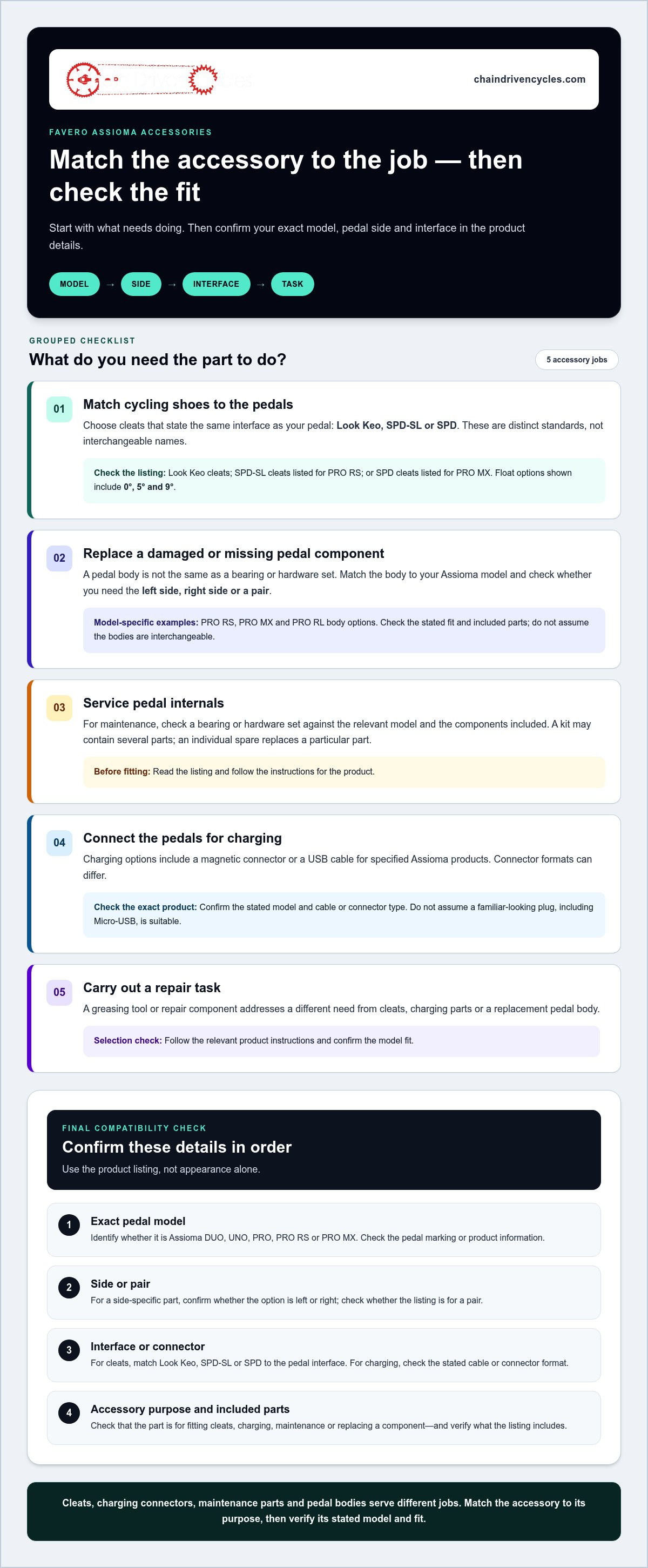
Use the product listing to check compatibility, not just to compare pictures. Accessories are specified for particular Assioma models, sides and interfaces. Before ordering, work through these checks in sequence:
- Identify the pedal model. Check whether your pedals are Assioma DUO, UNO, PRO, PRO RS or PRO MX. Don’t rely on appearance alone.
- Confirm the side. Note whether you need a left-side part, right-side part or pair. Some pedal-body options are side-specific.
- Match the interface. Check whether the part is for Look Keo, SPD-SL or SPD. These are distinct standards, not interchangeable names.
- Match the accessory to its purpose. Decide whether you’re replacing a body, fitting cleats, servicing components or sorting a charging connection.
Check the model and interface before ordering an accessory. This sequence helps rule out parts that look similar but are intended for a different pedal set-up.
How do you identify the correct Assioma model and pedal side?
Read the model marking on your pedals or refer to the product information you have, then compare it with the accessory listing. For pedal bodies, check both the model name and whether the option is for the left or right side. Listings for PRO RS, PRO MX and PRO RL bodies are examples of model-specific options; their names don’t mean the bodies are interchangeable. Check the stated fit and included parts, especially when selecting a side-specific variant.
Which cleat standard and charging connector do you need?
Start with the pedal interface, then choose a cleat listing that states the same standard. Look Keo cleats are different from SPD-SL cleats listed for PRO RS or SPD cleats listed for PRO MX. If the listing offers float variants, choose one that suits your preference and existing set-up rather than assuming all cleats allow the same movement.
Charging parts also need to match. The range includes magnetic connectors and a USB cable for specified Assioma products, but connector formats can differ. Check the product details for the exact model and stated cable or connector type. Don’t assume a familiar-looking plug, including Micro-USB, is suitable.
Once you’ve noted your model, side, interface and intended repair or charging task, use those details to narrow the Assioma power meter accessories selection.
Compare power meter accessories by the job you need done
Work backwards from the task: decide whether you need to match your shoes to the pedals, charge the unit, service a component or replace a pedal body. This comparison helps you identify the relevant type of power meter accessory. Use the listing’s stated model and fit details for your final check.
| Need | Accessory type | Compatible model | Key selection check |
|---|---|---|---|
| Fit cycling shoes to pedals | Favero Assioma Look Keo Cleats | Look Keo-compatible Assioma pedals | Choose the listed float option: 0°, 5° or 9°. |
| Connect for charging | Assioma Magnetic Connector or PRO USB cable | Specified Assioma products | Match the connector or cable to the product listing. |
| Grease during maintenance | Greasing tool | Model stated in the listing | Check intended use and model compatibility. |
| Service bearings and hardware | Assioma DUO bearing and hardware set | Assioma DUO | Confirm it’s the set for your pedal model. |
| Replace a pedal body | PRO RS or PRO MX body | Specified PRO model and side | Match model and side; the PRO MX right regular pedal is stated to suit PRO MX-1 only. |
| Replace several repair components | PRO Repair Kit | PRO products stated in the listing | Review the included parts and product fit. |
Which accessories support fit, charging and regular upkeep?
Look Keo cleats are a fit option, with listed float choices of 0°, 5° and 9°. Choose one that suits your preference and pedal interface. The Assioma Magnetic Connector is designed to reduce the risk of damage from accidental cable yanks. The PRO USB cable is a separate charging option, so check its product details rather than assuming cables are interchangeable. Greasing tools are for maintenance; match them to the specified model and instructions.
When should you compare pedal bodies, bearings and repair kits?
An Assioma DUO bearing and hardware set is not the same purchase as a replacement body for a PRO RS or PRO MX. A body listing may be specific to a model and side, so check both before choosing. The PRO Repair Kit, by contrast, includes multiple components: caps, seals, washers, tools and rings. If you need one specific part, compare its listing with the kit contents to see which suits the job. Follow product-specific instructions for fitting or maintenance.
Once you’ve identified the task and model, browse Assioma power meter accessories to compare the stated options and included components.
Common power meter accessory mistakes, and how to avoid them
A spare that looks like a bargain isn’t useful if it doesn’t fit your pedal. With power meter accessories, the model name, side and interface matter as much as the part’s appearance. A PRO RS, PRO MX or DUO component may look similar to another option, but that doesn’t establish compatibility.
What compatibility errors are easiest to make?
Before adding a part to your basket, compare the product details with your pedal. In particular, look for these common mismatches:
- Choosing by appearance: Match the accessory to the exact model stated in the listing. Don’t assume a PRO RS, PRO MX or DUO part will fit another series because it looks similar.
- Missing the side selection: For a pedal body, confirm whether the listing is for the left side, right side or a pair. A correct model with the wrong side is still the wrong part.
- Mixing cleat standards: Look Keo, SPD-SL and SPD are distinct interfaces. Match the cleat standard to your pedals, then check the stated float option against your intended set-up.
- Assuming connectors are interchangeable: Check the charging product’s stated cable or connector format and compatible model. A similar-looking connection isn’t proof of a match.
Power data is most useful when you can interpret it in the context of your riding. For a wider introduction to putting readings into practice, see this guide to training with a power meter.
How can you tell whether you need maintenance parts or a replacement body?
Start by identifying the component you intend to service or replace. A bearing and hardware set contains parts for that maintenance task; a repair kit groups multiple components; a pedal body replaces the body itself. They serve different purposes, so one isn’t automatically a substitute for another.
Read the product description’s included-parts list before choosing. A kit listing may name several components, while an individual body listing may specify a model and side. Compare that information with the part you’re missing or replacing. Not every issue calls for a complete pedal replacement. Follow the relevant product instructions for maintenance and fitting. For broader bicycle upkeep, read the professional bicycle maintenance guide.
Before ordering, check the model, side, interface, connector and included parts. Browse Assioma accessories by model and purpose to find an option that matches the job.
Choose your Assioma accessory with a final pre-purchase checklist
Before selecting a part, turn the problem you’re solving into a short set of compatibility checks. This helps narrow the power meter accessories to options that match your Assioma pedals and the task, whether you’re replacing a component, maintaining the pedal, fitting cleats or sorting a charging connection.
A quick checklist for selecting the right part
Keep these details beside you as you compare product descriptions. Don’t rely on a similar appearance or a broad series name alone.
- Pedal series: Write down the exact model, such as Assioma DUO, UNO, PRO, PRO RS or PRO MX. Check that the product listing names your model or the relevant model-specific fit.
- Component purpose: Decide whether you need cleats, a pedal body, bearings or hardware, charging parts, a greasing tool or repair components.
- Side or pair: For a pedal body, confirm whether the option is for the left side, right side or a pair. Don’t assume a single part includes both sides.
- Interface: Match cleats to the stated standard, such as Look Keo, SPD-SL or SPD, and check any stated float option against your set-up.
- Connector and included parts: For charging, match the connector or cable format to the product details. For kits and repair items, read the included-parts description so you know what the product supplies.
Each check rules out a different kind of mismatch. A correct series with the wrong side, cleat interface or connector can still leave you with an unsuitable part.
Where to start if you are still comparing options
Start with the category that matches your immediate need, then compare product descriptions for compatibility, side selection and included components. For a specific repair, check whether an individual part suits the task or whether a kit includes the components you need. For routine maintenance, follow the product-specific instructions rather than assuming a tool or hardware set fits every Assioma model.
A careful comparison is more useful than choosing by appearance alone. Once you’ve noted your model, purpose, side, interface and connector requirements, you’ll know what to look for.
Shop power meter accessories and compare the stated fit and included parts with your Assioma set-up.
Choose the right Assioma part with confidence
The right power meter accessories match both your Assioma model and the task at hand. Identify your pedal series, then check the part’s purpose, side or pair, cleat interface and charging connection. These details help distinguish routine maintenance items from a replacement pedal body or charging component.
The range includes specified accessories for Assioma DUO, UNO, PRO, PRO RS and PRO MX, including cleats, pedal bodies, bearings and hardware, charging components and repair tools. Chain Driven Cycles also sells Assioma power meter pedals and provides professional bicycle repair services. Read each product description carefully, especially its compatibility notes and included parts, before choosing.
Ready to find a part for your set-up? Browse power meter accessories and compare the listed details with your pedal model and intended use.
Frequently Asked Questions
How do I know which Assioma power meter accessory is compatible with my pedals?
Match the accessory listing to your exact Assioma model, then check the part’s purpose, side and interface. The range includes specified options for DUO, UNO, PRO, PRO RS and PRO MX, but not every part suits every model. Pedal bodies, for example, may be model- and side-specific, while cleats must match the pedal interface. Read the product details and included-parts information before selecting.
Can I use Look Keo cleats with Favero Assioma pedals?
Yes, Look Keo cleats suit Assioma pedals listed as Look Keo-compatible, including the original DUO and UNO and the PRO RL interface. Not all Assioma pedals use Look Keo cleats: PRO RS and PRO MX use different stated interfaces. Check your pedal model and the cleat listing, then choose a float option that suits your set-up if variants are offered.
What is the difference between SPD and SPD-SL cleats for Assioma pedals?
SPD and SPD-SL are distinct cleat interfaces, so they aren’t interchangeable. In the Assioma range, SPD cleats are associated with PRO MX, while SPD-SL cleats are associated with PRO RS. Check the interface stated for your pedal rather than judging by appearance. Match the cleat listing to that standard and check any other stated fit details.
Do I need a replacement pedal body or a bearing set?
A pedal body replaces the body component, while a bearing and hardware set is intended for maintenance of the specified pedal. They address different needs. Identify the part you mean to replace or service, then compare it with the listing’s model, side and included components. If you’re unsure which component is involved, don’t treat the product name alone as a diagnosis; follow the product-specific instructions.
What does an Assioma magnetic connector do?
An Assioma Magnetic Connector provides the magnetic connection used for charging with specified products. Its magnetic design is intended to reduce the risk of damage from an accidental cable yank. It isn’t a universal connector, so check which Assioma product the listing specifies and compare the stated connection with your pedal’s charging set-up. Don’t assume a similar-looking connector or cable will fit.
Are Assioma PRO accessories compatible with every PRO pedal model?
No. PRO accessories can be model-specific, and pedal-body listings may also distinguish left and right sides. Match PRO RS, PRO RL and PRO MX body options to the model named in the listing rather than treating them as interchangeable. Check the product description for the intended model, side and included parts before choosing an accessory for your PRO pedals.
What should I check before ordering a power meter accessory online?
Before ordering, note your exact Assioma model and the job the part needs to do. Check whether the listing specifies a particular model, a left or right side, or a pair. For cleats, match the interface and stated float; for charging parts, check the connector or cable format. Finally, read the included-parts description so you know what the item contains and whether it suits your intended task.